https://www.gravatar.com/avatar/a1a5f762bca516ff1fe40d39ac1e4f67?s=240&d=mp

Guanlan Dai

Python Basic Objects Learning Notes

Recently revisiting the book “Python Source Code Analysis”, I’ve recorded the key points about Python basic objects as follows:

​ Python Integer Objects

  1. Python integers use C language’s long type for storage
  2. Python int addition checks if the result overflows, and automatically converts to pyLongObject if it does
  3. Documentation in Python is seamlessly integrated into the language implementation
1
2
a = 11  
print a.__doc__
  1. Small integer objects are completely cached in memory, other integer objects take turns using a block of memory space
Look at This Year's Programmers' Problem-Solving Sequence

2010 developer’s problem solving sequence:

1.Google
For technical problems, definitely check Google and Wikipedia. Use Baidu more if you want to see adult product ads.

2.Coworkers
Ask coworkers for help. If your colleagues are helpful, technically skilled, and have encountered similar problems, their advice can be very valuable and might solve the problem immediately.

3.StackOverflow
Search for answers on programming help websites, or post questions if you can’t find answers. There are quite a lot of helpful people, but it seems this site has more Java/.Net questions.

Linux Command Line Decompression Tips

Everyone finds it frustrating that Linux has numerous compression formats, and each format corresponds to different commands, which is quite a headache.
Let me introduce a method to you:
Add this to your bashrc:

 1
 2
 3
 4
 5
 6
 7
 8
 9
10
11
12
13
14
15
16
17
18
19
20
ex () {  
if [ -f $1 ] ; then  
case $1 in  
*.tar.bz2) tar xjf $1 ;;  
*.tar.gz) tar xzf $1 ;;  
*.bz2) bunzip2 $1 ;;  
*.rar) rar x $1 ;;  
*.gz) gunzip $1 ;;  
*.tar) tar xf $1 ;;  
*.tbz2) tar xjf $1 ;;  
*.tgz) tar xzf $1 ;;  
*.zip) unzip $1 ;;  
*.Z) uncompress $1 ;;  
*.7z) 7z x $1 ;;  
*) echo "Unable to extract '$1' file!!" ;;  
esac  
else  
echo "'$1' is not a valid file!"  
fi  
}  

To decompress files, simply type “ex [compressed file]”. If you have other compressed file formats, you can add them yourself.

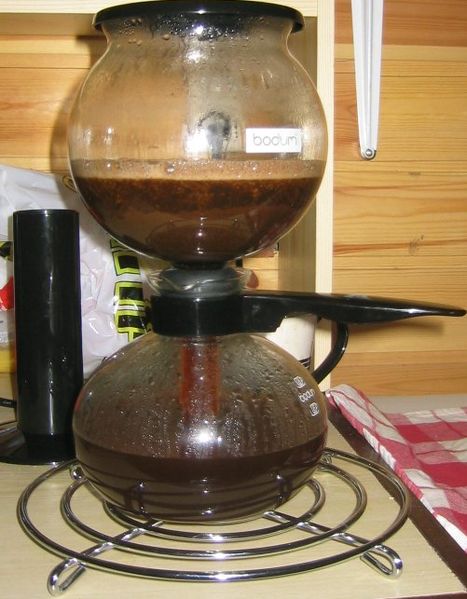
Can Emacs Really Make Coffee?

/img/467px-Vacpot3.jpg |
There’s a saying that goes: “Emacs can do anything, even make coffee!”

What does making coffee mean? This aroused my curiosity for investigation.

After searching online, I came up with several preliminary conclusions:

  1. This is just a fun saying, used to describe Emacs’s all-encompassing functionality.

  2. Java’s logo is a cup of coffee, used to figuratively represent writing code
    /img/java.png?v=20260404

My Favorite Nine Firefox Add-ons in 2010

Douban’s Firefox Group says:

Firefox is not perfect, not the most stable, not without vulnerabilities, and not the fastest, but it can be yours.

I really like this quote. It’s because of the rich and colorful add-ons that Firefox has become so popular.
The following add-ons are my personal favorites, and I recommend them to everyone!

1.ColorfulTabs

People can distinguish colors much faster than text. This add-on generates tab colors based on the page’s main color scheme, making your tabs colorful. Not only is it pleasing to the eye, but it also makes it easier to switch to the tab you want.

nginx Startup, Shutdown and Configuration Script

 1
 2
 3
 4
 5
 6
 7
 8
 9
10
11
12
13
14
15
16
17
18
19
20
21
22
23
24
25
26
27
28
29
30
31
32
33
34
35
36
37
38
39
40
41
42
43
44
45
46
47
48
49
50
51
52
53
54
55
56
57
58
59
60
61
62
63
64
################################################
#!/bin/bash
# v.0.0.3
# create by jackbillow at 2007.10.15
# redevelop by XGuru at 2010.6.28
# On Ubuntu 10.04
# nginx - This shell script takes care of starting and stopping nginx.
#
# description: nginx [engine x] is light http web/proxy server
# that answers incoming ftp service requests.
###############################################

nginx_path="/usr/local/nginx"
nginx_pid="/usr/local/nginx/logs/nginx.pid"
prog="nginx"

RETVAL=0


start() {
# Start daemons.
        if [ -e $nginx_path/conf/nginx.conf ];then
          echo -n $"Starting $prog: "
          $nginx_path/sbin/nginx -c $nginx_path/conf/nginx.conf &
          RETVAL=$?
        [ $RETVAL -eq 0 ] && {
        echo Start "$prog" successfully!
        }
        else
        RETVAL=1
        fi
        return $RETVAL
}
# Stop daemons.
stop() {
        echo -n $"Stopping $prog\n"
        sudo killall -9 nginx
        RETVAL=$?
}
# See how we were called.

conf(){
        gvim "$nginx_path/conf/nginx.conf"
}
case "$1" in
start)
        start
        ;;
stop)
        stop
        ;;
conf)
        conf
        ;;        
restart)
        stop
        start
        ;;
*)
        echo $"Usage: $0 {start|stop|conf|restart}"
        echo $"Your may need root privilege to execute this script!"
        exit 1
esac
exit $RETVAL

Original link: http://www.cppblog.com/xguru/archive/2010/06/28/118868.html